

System One
MinusPod includes a native System One adapter for ad detection, verification, and review. Detection and verification are supported. The optional reviewer is experimental. The ad category pass within detection is supported. Chapter generation and Pattern Cleanup are unsupported on System One routes.
Providers and credentials
Section titled “Providers and credentials”Open Settings > AI & Processing > LLM Provider to choose a provider for each credential slot. System One providers are:
| Provider | Endpoint | Credential |
|---|---|---|
| TypeSafe | Fixed TypeSafe System One endpoint | Provider A: TYPESAFE_API_KEY or its saved TypeSafe key. Provider B: its saved slot key. |
| System One compatible | <base-url>/systemone |
Provider A: SYSTEMONE_API_KEY or its saved compatible key. Provider B: its saved slot key. |
System One compatible model discovery uses <base-url>/models. Provider A uses its saved compatible base URL or SYSTEMONE_BASE_URL; Provider B uses its saved slot base URL. A compatible base URL is required and does not inherit OPENAI_BASE_URL. TypeSafe uses its fixed endpoint and does not need a configurable base URL. The slots have separate credentials and endpoints. Use the provider’s model catalog or enter a model ID supported by that endpoint.
Test and Test connection check the model catalog and need no stage model. Success confirms the catalog connection, not inference; a public catalog may accept any key. Automatic inference health checks still need a model selected for a supported stage on that slot.
The existing openai-compatible route remains supported for explicitly recognized Jev model IDs: jev-latest, jev-preview, and typesafe/jev. MinusPod does not infer System One behavior from an unknown model name. Existing installations that route one of these IDs through an OpenAI-compatible proxy can keep that detection and review route. The proxy does not make chapters or Pattern Cleanup supported.
Supported phases
Section titled “Supported phases”| Phase or feature | Support | Behavior |
|---|---|---|
| Ad detection | Supported | Uses the System One detection adapter and the selected slot’s profile. |
| Verification | Supported | Uses the verification stage’s effective provider, model, slot, and profile. |
| Ad category classification | Supported | This is part of ad detection. It can be enabled or disabled per profile. |
| Ad Reviewer | Experimental | Confirm, adjust, reject, and resurrection review are available. The Settings page warns when either reviewed pass resolves to a known System One route. |
| Chapter generation | Unsupported | Enabled chapter generation cannot be saved or run when its effective route is System One. Choose a chat provider and model or disable chapter generation. |
| Pattern Cleanup | Unsupported | Enabling scheduled cleanup or starting a manual run is blocked on a known System One route. Choose a chat provider and model. |
Unsupported selections remain visible so they can be repaired. Capability checks use the effective provider and a recognized model ID; unknown model IDs are not guessed from their names.
TypeSafe and System One compatible providers are never offered as a chat failover target: a failover configuration whose provider and model resolve to a System One route is treated as unconfigured for failover purposes.
How detection is scored
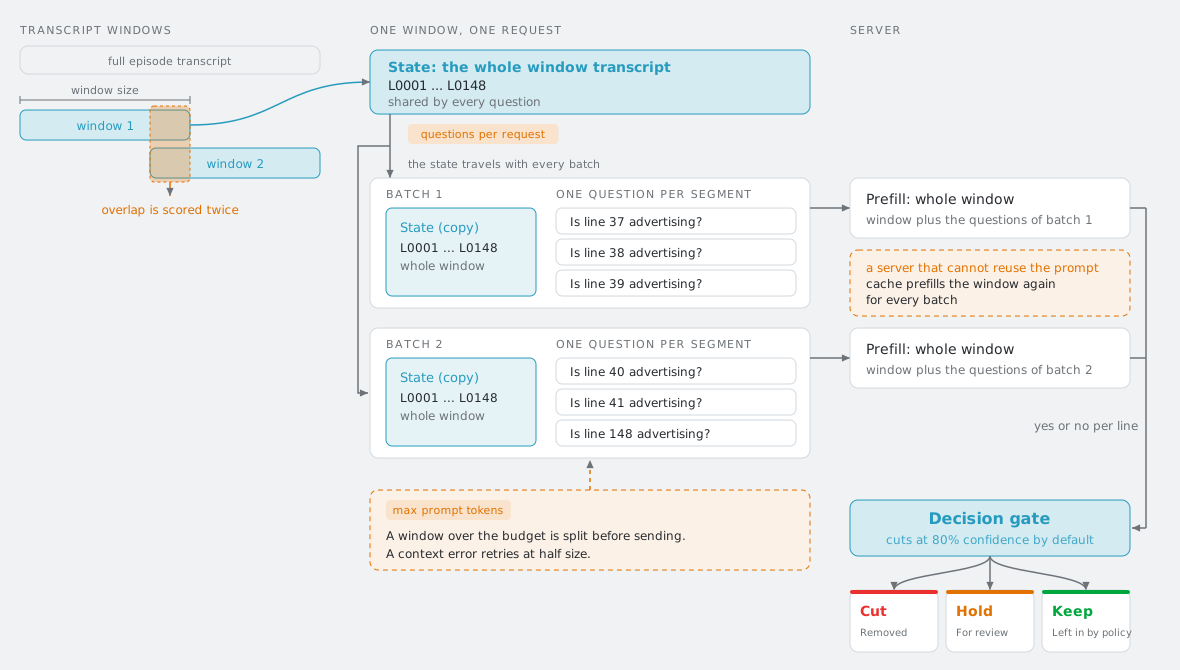
Section titled “How detection is scored”One detection window becomes one System One request. The whole window transcript is the shared state and there is one yes or no question per transcript line, so the per-question context is the window, not the question count. Questions per API request only decides how many questions share a request; every batch carries the same state. Windows overlap by the detection overlap setting, and the overlap is scored twice.
Independent tuning profiles
Section titled “Independent tuning profiles”System One tuning is stored independently for each credential slot and provider type: Provider A TypeSafe, Provider A System One compatible, Provider B TypeSafe, and Provider B System One compatible. Switching providers or slots keeps each profile. Profiles also remain in configuration exports. Importing an older export merges only fields it contains, preserving newer values already saved at the destination. Reset profile restores that profile’s defaults.
Open the System One Tuneables section under AI & Processing. It shows one profile for the selected slot’s current native provider type. When both slots use native providers, the Provider selector switches between Provider A and Provider B. Changing a slot’s provider type preserves the other profile’s saved values and unsaved edits. A saved native Provider B profile remains editable while Provider B is disabled.
| Setting | TypeSafe default | Compatible default | Meaning |
|---|---|---|---|
| Detection confidence threshold | 0.95 | 0.95 | Probability needed to open a detected segment. |
| Minimum confidence to continue a segment | 0.40 | 0.40 | Probability needed to extend an open segment. Must not exceed the detection threshold. |
| Run ad category classification | On | On | Make the additional category request for detected segments. |
| Neighboring segments for category context | 2 | 2 | Transcript segments included on either side for category classification. |
| Default ad category | Sponsor | Sponsor | Category used when the category pass is disabled. |
| Refine ad boundaries | Off | Off | Opt in to the source adapter’s ordered refinement questions. |
| Logical request deadline | 75 seconds | 75 seconds | One total budget for all stages of a logical adapter call. Each HTTP request also has the common slot timeout. The deadline applies per request and overrides a longer provider timeout. Local prefill on a 16k context can exceed 75 seconds, so raise it for slow local backends. |
| Evidence enter threshold | Blank | Blank | Blank follows the detection threshold. |
| Choice enter threshold | Blank | Blank | Blank follows the detection threshold. |
| Programme match veto threshold | 0.85 | 0.85 | Confidence threshold for the review programme-speech veto. |
| Maximum boundary change | 60 seconds | 60 seconds | Maximum review boundary adjustment offered. |
| Review context | 30 seconds | 30 seconds | Transcript context included around a review candidate. |
| Questions per API request | No limit | No limit | Optional protocol cap. Requests are split in order when a cap is set. Detection sends one question per transcript segment in a window, so uncapped requests can carry several hundred questions. Some third-party endpoints reject large requests (Bespoke Labs Nimble accepts 64); set the cap below that limit. This changes how many questions share one request, not the per-question context, which is the whole detection window. |
| Prompt token budget | No limit | No limit | Optional budget in estimated tokens (4 characters per token) for one detection request. A window that estimates above it is split into the smallest number of equal parts that fit, each part is sent on its own, and the answers are merged. Set it a little under the model’s context, for example about 7000 for an 8k model. Blank sends each window whole. The category pass is not split. |
| Request size limit | No limit | No limit | Optional serialized JSON request-body cap. |
| Maximum Choice options | 255 | No limit | TypeSafe’s fixed limit is 255; compatible endpoints can use an operator-set limit. |
| Maximum concurrent operations | 4 | 4 | Per-process capacity for logical operations sharing an endpoint and credential. A waiting operation uses the logical deadline. Set this to the backend’s parallelism. |
| Maximum Retry-After wait | 5 seconds | 5 seconds | Caps the upstream rate-limit wait on the first retry, within the logical deadline. Zero permits no upstream-hint wait. |
If the backend still answers a detection request with a 400 that reports a context overflow, MinusPod splits that part in half and retries, up to 3 times (8 parts). If the smallest part still fails, the window is recorded as lost to a context overflow in the run summary. System One scores one question per transcript segment against the whole window, so cost scales with segment count, and overlapping windows score the overlap twice. On local servers whose model cannot reuse the prompt cache across batches (llama.cpp reports “forcing full prompt re-processing” for hybrid models), every batch pays a full prefill of the window. Smaller windows or a hosted System One model are the practical fixes. Ollama’s context comes from the model (the Modelfile num_ctx) and is not sent on System One routes. A proxy such as LiteLLM may not pass it through.
Concurrency capacity is shared across slots and provider types when the normalized endpoint and credential match. If profiles for the same endpoint and credential specify different capacities, active and queued work observes the stricter limit. The queue is process-local, not a distributed cluster limit. Waiting is bounded by the logical request deadline and observes cancellation and credential changes. A local queue timeout does not send an upstream request, create a request-usage row, trip the provider circuit breaker, or trigger chat failover.
HTTP retry count uses the existing per-slot retry setting. TypeSafe and compatible providers default to two retries. Shared retry and Retry-After handling are described in LLM providers. Each actual POST attempt has its own request usage record. Missing token usage remains unknown rather than being reported as zero.
TypeSafe’s known Jev price is $0.042 USD per 1 million input tokens, with free output tokens. Compatible endpoint costs use provider-reported costs or configured pricing; otherwise they remain unknown. Caller prompts, policy, and context are preserved and translated into the adapter’s questions. Saved temperature, thinking budgets, token caps, JSON-schema controls, and Ollama context settings are retained but ignored on System One routes.
Statistics
Section titled “Statistics”The Stats page separates logical System One calls from HTTP requests. A logical call may contain multiple detection, category, review, or refinement requests. Logical diagnostics include the phase, outcome, review reason, and refinement counts. The Average call time card displays milliseconds. Average logical time covers complete adapter calls, including local waits and retries; HTTP dispatch time sums actual request attempts. Token totals include reported values. Known costs include provider-reported amounts or estimates from known pricing. Missing or partially reported usage remains unknown. GET /api/v1/stats/systemone supports the Stats page filters: from, to, podcastSlug, provider, and model. Date filters select whole UTC days.
Pattern Cleanup statistics (GET /api/v1/stats/cleanup) are defined in Pattern Cleanup > Statistics.
Migration and configuration backup
Section titled “Migration and configuration backup”If an installation currently calls the TypeSafe Jev proxy through openai-compatible, it can keep the route when its model is one of the recognized IDs above. To move to the built-in TypeSafe provider, select TypeSafe for the credential slot, save that slot’s TypeSafe API key, then select the model offered by TypeSafe and route detection, verification, or review to that slot. No OPENAI_BASE_URL value is reused as a System One compatible base URL.
A custom System One endpoint uses the System One compatible provider. Set its own base URL and key for the selected slot. The provider sends requests to /systemone and discovers models from /models under that base URL.
System One profiles and credentials are included in Configuration Import / Export. Credentials are re-encrypted for the destination installation. Import merging rules are in Configuration Import / Export.
Upstream source and license
Section titled “Upstream source and license”The adapter behavior is ported from MinusPodJev, commit 8ef6033459d8d32b3437db915b9175c2241c34f0. The upstream project is MIT licensed; the applicable MIT notice is retained in src/systemone/LICENSE. Server, proxy authentication, response caching, and module-level metrics are not part of MinusPod’s native adapter. Sponsor candidate lookup uses MinusPod’s existing sponsor service.